
How to Make Park Reservations for Disney World
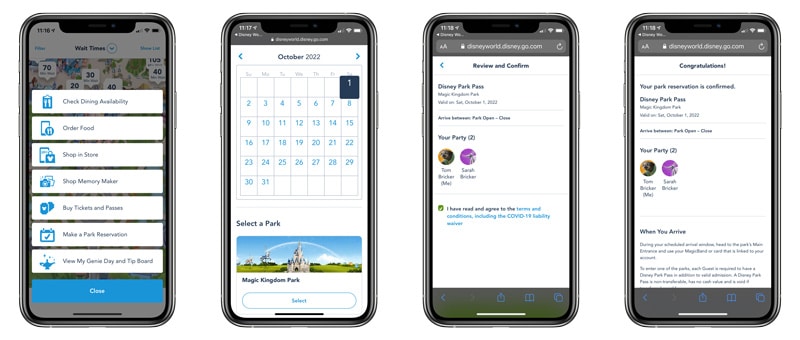
Park Pass is Walt Disney World’s advance theme park reservations system for booking entry to Magic Kingdom, Animal Kingdom, Epcot, and Hollywood Studios. This is required in addition to buying tickets between now and January 18, 2024 in order to enter the parks. This how-to guide covers the steps for making Disney Park Pass reservations, offers troubleshooting advice, and more. (Updated March 20, 2022.)
For starters, the Disney Park Pass system is available on DisneyWorld.com–not the My Disney Experience app (although there is a link within the app to take you to the reservation website). To use this system, start by making sure your tickets and resort reservation are linked in My Disney Experience, and your family and friends list is properly populated.
Now in use for nearly two years, the Disney Park Pass system has been controversial and frustrating for many fans. So much so that one of the most common reader questions during that time is When Will Walt Disney World Stop Requiring Park Reservations? We speculate and attempt to answer that question in that post. Here, let’s continue on with the details of Disney Park Pass, and making advance online reservations for the theme parks at Walt Disney World!
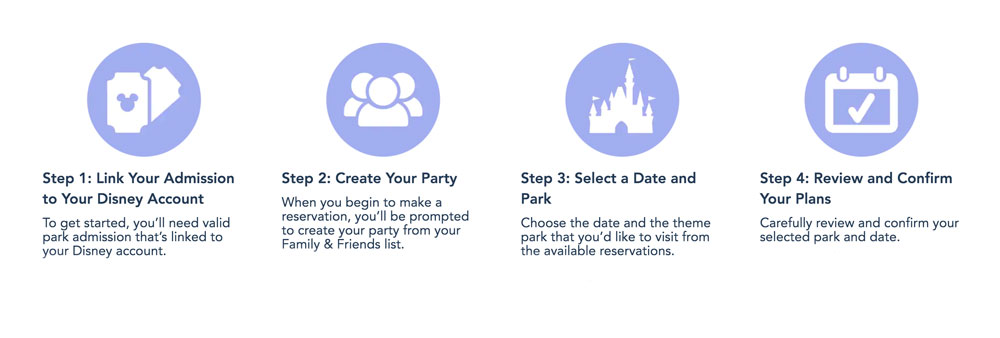
Step 1: Link Your Admission to Your Disney Account
To get started, you’ll need valid park admission that’s linked to your Disney account.
- First, you’ll need a Disney account, which is where your Walt Disney World plans are stored and managed. Create an account or sign in to your existing account.
- Then, link your valid admission to your Disney account. All Guests in your party must also have valid park admission linked to their profile. Note: At this time, new ticket sales are temporarily paused, and sales will resume at a later date.
- If you have a Disney Resort hotel reservation, be sure to link it to your Disney account as well.
Once your admission is linked to your account, you can begin to make a park reservation…
Step 2: Create Your Party
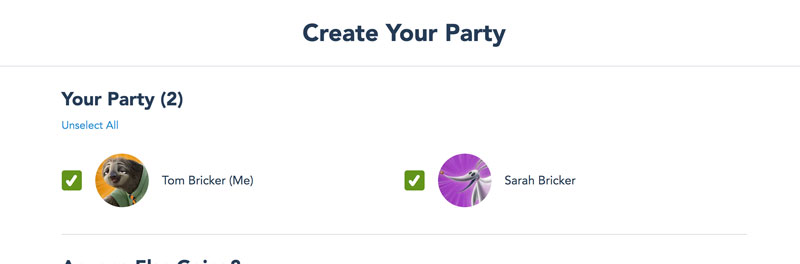
When you begin to make a reservation, you’ll be prompted to create your party from your Family & Friends list.
Simply select the family and friends you’d like to include, then hit the Continue button.
Don’t see someone in your travel party? Select “Add a Guest” to include them.
You may need to make more than one Disney Park Pass reservation for your party depending on your admission type. Please make sure your party consists of Annual Passholders or theme park ticket holders.
Staying in a Disney Resort or other select hotel with a package that includes tickets? Everyone in your party must also have a hotel reservation. If this varies, you will need to make separate Disney Park Pass reservations.
Step 3: Select a Date and Park
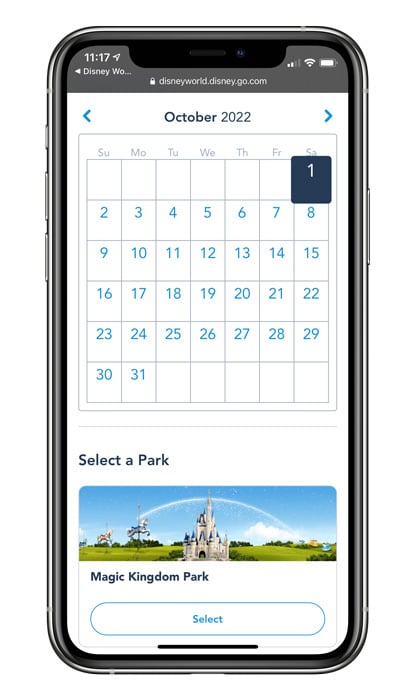
Choose the date and the theme park that you’d like to visit from the available reservations. Please note that dates and theme park selections are limited and subject to availability.
After creating your party in the Disney Park Pass system, you’ll be prompted to:
- Select a Date: View a calendar and choose one of the available dates for your visit.
- Select a Theme Park: Park hours will be displayed for your convenience.
- Select a Time: This is the time that you can visit the park.
NOTE: Selecting a time is simply “confirming” the park hours, not an actual arrival window.
After selecting your date and park, you can confirm your reservation.
Step 4: Review and Confirm Your Plans
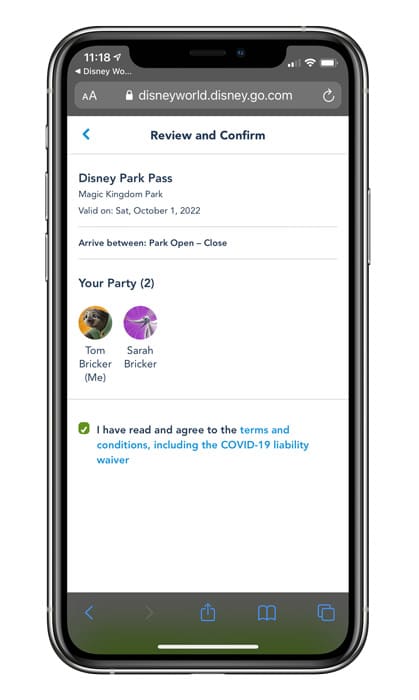
Carefully review and confirm your selected park and date.
If you need to make any changes, select “Back” to revise your selections.
Before confirming, you’ll need to agree to the Terms & Conditions, including the health certification and liability disclaimer waiver. (For this reason, it’s unlikely that travel agents will book Disney Park Pass reservations like they do/did for FastPass+ or ADRs.)
Then, select “Confirm” to complete your park reservation. Once confirmed, your reservation will appear in My Plans on My Disney Experience or DisneyWorld.com.
Want to make another park reservation? Select “Make Another Reservation” to continue planning. As a reminder, if you have a multi-day ticket, you will be required to make a park reservation for each date of your visit.
If you need to cancel a reservation, view your daily itinerary in My Plans, then select “Reservation Details”.
We’ve now used the Disney Park Pass system numerous times, and the process usually works pretty smoothly. Nevertheless, you might have issues getting DisneyWorld.com to work. In terms of troubleshooting, our #1 solution is always to use private browsing or incognito mode on your desktop browser to access DisneyWorld.com.
This won’t always resolve your problem, but usually it will. It’s at least worth a shot. In any case, hopefully that preemptively answers some reader questions we’d otherwise receive and saves some of you some headaches.
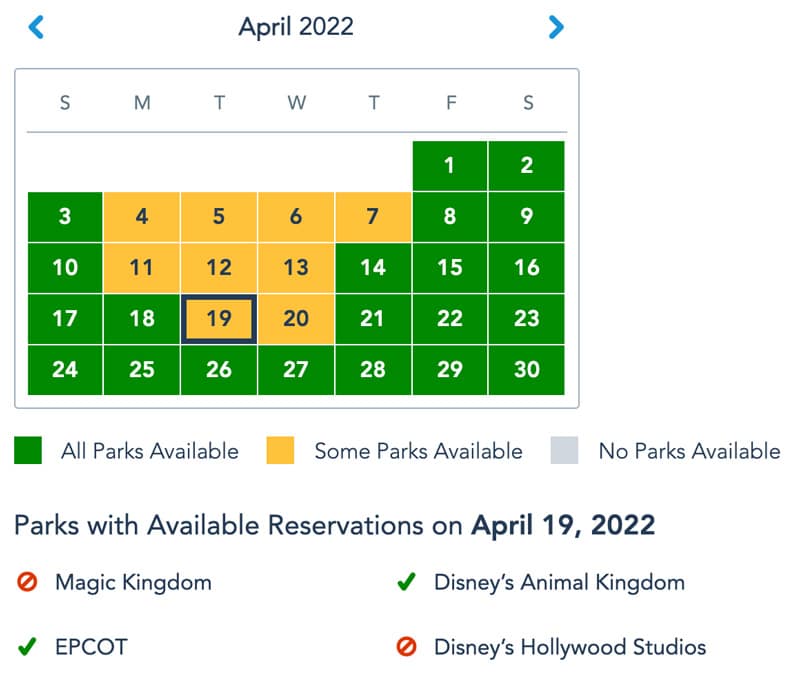
We’d recommend making reservations weeks or months in advance, rather than days ahead of time. While you’ll be fine most of the time booking Park Passes at the last minute, that’s not always the case.
Availability varies wildly depending upon demand. In the off-season, reservations are mostly a formality. By contrast, park reservations are already booking up (see above) about a month before peak dates in April 2022. Plan accordingly and err on the side of making reservations early just in case.
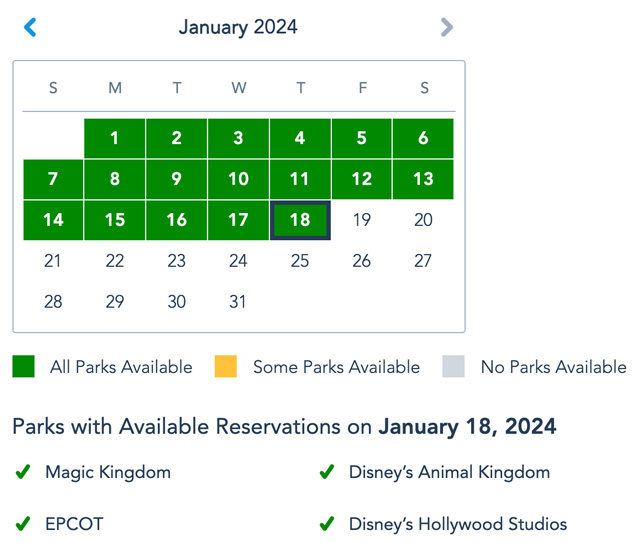
With that said, it’s never necessary to book reservations 2+ months in advance. Many Walt Disney World fans stress out over planning every little detail of their trips 6+ months in advance. While that’s understandable when it comes to Advance Dining Reservations and even resort bookings, the same diligence is not necessary with Disney Park Pass reservations.
The vast majority of guests simply do not plan that far in advance. Since Walt Disney World began requiring Park Pass reservations, there is only one date that filled up months in advance–October 1, 2021. That was the 50th Anniversary of Walt Disney World, and is quite obviously a “special case.” If you’re just visiting for some random week in July 2022, you need to start thinking about reservations in June…not April.
Planning a Walt Disney World trip? Learn about hotels on our Walt Disney World Hotels Reviews page. For where to eat, read our Walt Disney World Restaurant Reviews. To save money on tickets or determine which type to buy, read our Tips for Saving Money on Walt Disney World Tickets post. Our What to Pack for Disney Trips post takes a unique look at clever items to take. For what to do and when to do it, our Walt Disney World Ride Guides will help. For comprehensive advice, the best place to start is our Walt Disney World Trip Planning Guide for everything you need to know!
YOUR THOUGHTS
What do you think about the Disney Park Pass reservation system? Think these policies seem fair in light of the ongoing global pandemic and reduced capacity of the parks? Think that many days will sell out, or that most will be available on short notice? Will you be attempting to visit Walt Disney World this summer or fall, or are you waiting until when this (hopefully) goes away? Do you agree or disagree with our advice? Any questions we can help you answer? Hearing your feedback–even when you disagree with us–is both interesting to us and helpful to other readers, so please share your thoughts below in the comments!

I just clicked a button about reservations being required for the park (from the MDE page) and now i’m at the “you are almost in orbit” page… hopeful!
After the orbit countdown finishes, it just restarts back to 15 minutes.
Mine did add time a few times, but i’m finished now. It worked as described after you finally get into it.
8:11 am ET and it is finally live with a 12 minute wait time. A new link popped up on the Park Pass reservation page to “Make your Reservation” in top right corner area. Be persistent and you should get there.
Thanks for the update.
Did you have to refresh? Or did the pink castle magically disappear?
How do you get to the reservation page? I cant find it!
The Parks Pass page is under the MDE drop down menu. Yes, I did have to keep refreshing.
Doesn’t your clock keep resetting though? For me it goes like 30 seconds and then adds the time back.
The button just popped up on the reservation page for me.
Where are you at – on the website?
Yes! Under reservations…says a bit over 2 minutes…”in orbit”
Yes on the website. It popped up both in the pass screen and in my Disney experience screen. Put me in a 3 minute hold it says
are you refreshing or just letting the castle sit there?
no more castle where i’m at. i went to my reservations under my disney experience and there was a button to check park availability…now i’m “in orbit” with less than a minute. we’ll see….
I got down to 00:00 and it’s just sitting here…
Still in pink castle mode… 8:10 Eastern Time
Try to sign in on a different tab. It will take you to the orbit page. I did that and the orbit counted down and kicked me out. Waiting again now
Has anyone had any luck getting through the phone lines or website?
I have been on the phone holding for about 32 minutes
Lol! That’s the funniest thing I have heard all morning!
Got through on a phone – spoke to a really lovely cast member who was stressed out
but has anyone got an almost in orbit, with a countdown?
So travel agent friend got confirmation from a cast member and site is down. They most definitely should have tiered it based on your resort reservation but what do I know?
Is volume really the issue? Maybe they should have tiered it but it doesn’t even look like they were able to get the functionality in yet. Multiple people, including myself for a while there, were able to get to their plans but there is not link for the reservation system.
Though if they had tiered it then not so many people would have had a bad experience this morning. Just the diehards going back this summer.
Now their whole customer base with a reservation is upset.
When I finally got into my Disney experience- the park reservation calendar WASN’T working. I’m back to looking at the Castle now.
I cannot even log into the page. The Disney front page opens, and as soon as I clicked on the Sign In link, I got the pink castle. That happened at 7:10 and it is still there.
Hey guys, 8:07 am and we still see the castle.
Any updates on your side?
No updates on my side
Computer still shows castle, but the app JUST updated to show a blue box that said “make park reservation.” Clicked it, and am in another queue showing “We’re almost in orbit” (Space Mountain pic) and a countdown. Currently at 8:48….
How long is too long to wait, over an hour now just a pink castle?
Lol, I’ve been waiting since midnight EST based on some bad information from two cast members that the reservation system could be up hours before 7am. Definitely questioning my life choices a little bit right now…
Thanks, Bob Chapek–I feel so “lucky” to have the “magic” return!
Calling in, the auto system states, at this time, they cannot make any reservations or changes. They are only answering questions. 8:05am. They say to call again later…
I was just speaking to someone via the online Disney chat and this was what they said:
“The Theme Park reservation system is not yet available. Please keep checking back on the website throughout the day for updates.”
When asked what time it would be opening this is what they said, “We do not have a time frame available. We encourage you to check back often throughout the day for updates.”
Best of luck to all.
More evidence that the time was supposed to be 7am and they are trying to fix it.
At least that is good advice given they don’t know.
So does that mean the website will be unavailable all day until it’s loaded. I haven’t been able to even sign in to MDE for an hour.
Thank you for sharing this Abby!! I can’t log in either and couldn’t get through on the phone and at least now can move on with my day! Hang in there everyone! Best to you all!
Thank you so much for the update. I feel so much better knowing it isn’t something I’m doing wrong. Good luck today!
Well people camp all night outside shops for the latest gear – guess its a bit like that.
Feel for you guys in different timezones (13:02 in UK is not too bad), although we didn’t get much sleep as worried about this.
Hahaha! Yeah. I’m luckily on the east coast of US, so not bad for me either. Feel bad for the West Coasters.
The difference is you know when the store is opening. This is the store opening late with no lights on inside.
8:06am ET refreshing pink castles since 7:00. I had gotten as far as into My Plans, but didn’t see where the link would be to make park reservations. I appreciated the process descriptions, but it didn’t say where to start. I guess they thought it would be too obvious.
I’m on the my disney experience page, not sure how but can’t really do anything from there yet
Still have the pink castle (50+ minutes and counting). Tried calling and “all cast members are helping others” and an auto hang up. This is a cluster…… No email with gift card. I agree with the person who said they should have parsed it out by resort reservation dates for the first week or two to ensure this didn’t happen.
Agreed. I just don’t know why Disney doesn’t plan ahead with stuff like this – knowing that there will be MANY people trying to log on and do this right now. SIGH. We aren’t even sure if we’ll go in October when our trip is reserved, but we want to have the option. Asking a 4-year-old to wear a mask all day every day might be a challenge… lol.
P.S. Still a pink castle on my end.
7:58 am still have pink castle 🙁
Me too! I WAS on the My Plans page and when I refreshed it – back to the castle. So frustrating.
I’m still on my plans and refreshing but afraid to move around so I don’t lose this page!
Kelly S…that happened to me too. When I refreshed I got the castle. I was frustrated with knowing I had to wait again to get back in so I I hit the back button and got my plans back up.
Has anyone gotten pass the Pink castle screen? How long did you wait? Curious to know after the pink castle, how long that process takes.
Where exactly will the calendar be located when up and running? My plans, home page?
Thanks
I’ve been past the Pink Castle for a while but there’s nothing to do – no links/pages about the Pass System have any new information or links to reserve dates.
I managed to get passed the castle and now stuck on the sign in page saying “signing in”. Is this right as I am scared to refresh?
I logged into MDE about an hour before things were supposed to go live. No problem logging in and checking to make sure my resort reservation and AP were linked. All looked good. At 7:00am Eastern I clicked the refresh button on the browser, and MDE logged me out. I haven’t been able to log back in since. Just staring at the pink castle. I’m currently logged in on the app on my phone, but there’s no button there that takes you to a park reservation page in the app (that I can find, at least).
I was told in a text in the MDE app yesterday that we would NOT be able to make park reservations through the app, but only with MyDisneyExperience online.
I’ve been able at times to see MyPlans, but didn’t see where to start the Park Reservation process. Now just pink castle. I get excited when I see the image blink, but then it is just back to the pink castle.
Per a disney blog (do not remember which one) you will not be able to make reservations via the app, only the website.
Almost exact same scenario happened to me!
I think I read somewhere you can only make the park reservations from disneyworld.com and not the app.
Weird…when I called yesterday the Disney Rep I spoke to said I might have *better* luck on the app. I am attempting both but currently have the pink castle online the the app appears to be on the correct page (referring to “this online tool–coming soon”) but isn’t live yet. I’m sure I’m not helping online traffic by having two devices trying simultaneously.
I didn’t think you could use the app, but I figured it wouldn’t hurt to look, just in case it pops up. Still looking at the pink castle here at the website, some 70 minutes later. This is getting ridiculous.
Simone, where exactly in the app do you see a “coming soon” for the reservation system? I can’t even find that in the app.
This is a long morning. I’m glad we all seem to be in the same boat at least.
OK, I finally found the link to the park pass in the iPhone app — I had to go to the page for the “phased reopening” of Walt Disney World parks, then scroll down to find the link to get more information about the park pass reservation system. From there, a link was present, and when I clicked its it sent me to the MDE website. I’m. on the page there with the “You’re almost in orbit” countdown timer. We’ll see if that works…
DO NOT TRUST CLIFF AND JOHN! THEY ARE BAD PLAYERS TRYING TO DISSUADE PEOPLE FROM BUYING TICKETS SO THAT THEY CAN GET THE BEST TICKETS THEMSELVES! THEY ARE LIARS! MY UNCLE IS A DISNEY REPRESENATIVE AND HE TOLD ME THAT IT SHOULD HAVE BEEN AVAILABLE AT 7. KEEP TRYING AND COMPLAIN TO DISNEY WHEN ABLE. I ALSO ASKED HIM ABOUT CLIFF AND JOHN, HE SAID HE DOESN’T KNOW ABOUT THESE TWO PARTICULARLY, BUT THAT HE KNOWS THERE ARE BAD APPLES WHO WANT TO TAKE BEST TICKETS FOR THEMSELVES AND NOT LET OTHER PEOPLE HAVE THEM. FAIR IS FAIR! CLIFF AND JOHN, DO THE RIGHT THING!
So since you have a family member as a representative once the system goes live where do we go to get to the park pass system?
Hahahaha! Hilarious.
Though the all caps is a little much.
Big Tod, no one can buy tickets right now. Plus I have an annual pass, so….
Or are you talking about the park slots? I don’t think anyone is going to dissuade people on this site from trying to get in. Think my comments were all around how I didn’t trust that line from Disney for one second. They clearly meant to go live at 7am and ran into Stitch. Guy is always causing problems.
My uncle went back to bed because it is so early. I will ask when he wakes up.
Cliff, I apologize I lashed out. It is only that I am so frustrated with dismal Disney. It is no excuse, though. I am sorry. And hey, congrats on the annual pass!